
A customer ledger that works with zero server, zero account, zero subscription.
Simple Billing is an offline-first Android app for solo beauty and event-service providers — customers, bookings, bills and payments, tracked entirely on the device. No backend, no network API, no cloud database. Built solo, end to end, and still in active development ahead of its first release.
A ledger, a booking book and a PDF printer, replacing a notebook.
Simple Billing is a single-user Android application built for a solo service provider — the kind of business that has one operator, no accounting staff, and no fixed shopfront — to track customers, bookings, bills and payments entirely on the device, with no server, no account and no subscription.
Every customer gets a running ledger of bills and payments. The app computes a live balance for each customer — pending, settled or advance — generates PDF bills and receipts using the business's own letterhead details, and hands them to the customer over WhatsApp, the channel this class of business already uses for everything else. A PIN-and-biometric lock screen protects the data, and a local backup system lets the owner move data between devices without ever touching a cloud service.
The domain language points at a specific user: an India-based solo beauty or event-services provider — bridal makeup, mehndi, styling, small-scale event decor — who takes bookings tied to a date, bills per event or per visit, and talks to customers almost exclusively through WhatsApp rather than email or a customer portal.
Sole developer, end to end — product definition, data model, UI, PDF/document generation, local security, backup/restore and the booking-reminder pipeline. There is no design team, backend team or QA function on this project; it is a solo engineering effort, still in progress, not a finished commercial product.
A notebook, a chat history, or a spreadsheet — and none of them answer one question.
A solo service provider's alternative to this app is a paper notebook, a WhatsApp chat history, or a spreadsheet. All three have the same failure mode: there is no single place that answers "does this customer owe me money, and how much" without manually re-adding a column of numbers.
None of them produce a document a customer can be handed or forwarded. And none of them is private by construction — a spreadsheet synced to a personal cloud account, or a notebook photographed and sent over chat, spreads financial data further than the business owner may realize.
No single source of truth
Balances live across a notebook, a chat thread and a spreadsheet — never in one place.
Manual reconciliation
"Does this customer owe me money" means manually re-adding a column of numbers.
No document to hand over
None of the three alternatives produce a document a customer can be handed or forwarded.
Not private by construction
A notebook photo sent over chat, or a spreadsheet on a personal cloud account, spreads financial data further than intended.
One computed number per customer, never manually maintained.
Simple Billing collapses "who owes what" into a single computed number per customer, derived from a running ledger rather than manually maintained — the balance can never drift out of sync with the entries that produced it, because it is never stored, only calculated on read.
On top of that ledger sits a lightweight pre-sales funnel — Enquiry → Booking → billable customer — so the same list that tracks money owed also tracks leads that haven't converted yet. Every bill and receipt can be turned into a PDF and pushed to the customer's phone over WhatsApp in the same flow the business already uses to talk to them, and the entire dataset is protected behind a PIN/biometric lock and backed up to a local file the owner controls.
Computed Ledger Balance
A customer's balance is the fold-sum of their ledger entries, calculated on every read — never a stored field that can drift.
Enquiry → Booking Funnel
A lightweight pre-sales funnel, computed live from booking and ledger data, not a status field kept in sync by hand.
PDF + WhatsApp Delivery
Every bill and receipt becomes a PDF and reaches the customer over the channel the business already uses.
PIN, Biometric Lock & Local Backup
The dataset is protected on-device and backed up to a file the owner controls — no cloud account required.
What this replaces, in practical terms.
Framed honestly for a pre-release app — capability the app is designed to deliver, not invented metrics.
One Always-Correct Number
Replaces a paper notebook or spreadsheet with a single balance per customer that is correct by construction, removing manual reconciliation as a source of error.
Bill-to-Delivery in One Interaction
Cuts the time between finishing a job and getting a professional-looking bill in front of the customer to the length of a WhatsApp share-sheet interaction.
No SaaS Costs, No Vendor Risk
Removes recurring billing-software costs and the data-handling risk of a third-party vendor holding customer financial records — at the honest cost of no multi-device sync.
Single-process, four-layer, no network boundary.
There is no client-server split to diagram because there is no server — every arrow is an in-process Dart call or a platform-channel call to a bundled plugin.
Presentation
Flutter widgets, StatefulWidget-held local state — main.dart plus 6 standalone screen files. No routing package beyond Flutter's built-in Navigator.
Business Rules
Pure functions in lib/utils — booking_rules, payment_split, profile_migration. The only layer with automated unit tests.
Persistence
Hive, an embedded NoSQL database — customers, bookings, app_settings, meta, and one ledger_<id> box per customer. No ORM, no SQL.
Platform Bridge
Plugin packages with zero network calls — local_auth, flutter_local_notifications, pdf/printing, share_plus, url_launcher, file_picker, path_provider, archive.
Flutter and Hive — nothing running on a server.
"Frontend" and "backend" here means responsibility within one app, not separate deployables.
Flutter / Dart
SDK ^3.10.8Cross-platform UI toolkit — Material widgets throughout, no custom design-system package.
cupertino_icons
^1.0.8iOS-style icon set, bundled by the default template.
font_awesome_flutter
^10.7.0WhatsApp glyph used on customer list rows and share actions.
intl
^0.19.0Date formatting (dd MMM yyyy, bill-number timestamps) across every screen.
NotoSans (bundled TTF)
Regular/Bold/ItalicCustom asset font, embedded specifically for offline ₹ glyph rendering in generated PDFs.
hive / hive_flutter
^2.2.3 / ^1.1.0Embedded key-value database — all application data.
hive_generator + build_runner
^2.0.1 / ^2.4.6Dev-time code generation for Hive type adapters.
path_provider
^2.1.5Resolves the app's document directory for Hive storage and temp PDF files.
archive
^3.6.1Zip creation/extraction for local backup and restore.
local_auth
^2.2.0Biometric authentication (fingerprint/face) for app unlock.
crypto
^3.0.3SHA-256 hashing, used for PIN storage.
pdf / printing
^3.10.8 / ^5.12.0PDF document construction; the printing dialog API is declared but not yet wired up.
share_plus
^10.0.2OS share sheet for handing generated PDFs to WhatsApp or any other installed app.
url_launcher
^6.2.5tel: phone calls, wa.me / whatsapp:// deep links, UPI link construction.
file_picker
^8.0.0Zip file selection for manual restore.
flutter_local_notifications
^18.0.1Local, device-scheduled booking reminders — no push infrastructure.
timezone / flutter_timezone
^0.9.4 / ^5.0.2Resolves the device's real IANA timezone so reminders fire at the correct local time.
Not present — No ORM, no state-management library (plain StatefulWidget/setState throughout), no HTTP client actually wired to a remote host, no schema/form-validation library, no analytics SDK, no crash-reporting SDK, no push-notification provider.
Nine feature deep-dives, straight from the source.
Purpose, business value and engineering implementation for every feature — no roadmap items, everything below is built.
Ledger & Balance Engine
Give every customer a single, always-correct balance figure without a stored "balance" column that can drift out of sync.
The owner never has to reconcile a number — the displayed balance is mathematically guaranteed to match the transaction history, because it is the transaction history, summed.
Each customer's transactions live in a dedicated Hive box (ledger_<customerId>). Every entry carries a signedAmount getter — bills positive, payments negative — and the balance is the fold-sum of that field, computed on every read rather than persisted.
Bill & Payment Entry, with Overflow Splitting
Record an itemized bill or a payment in a single dialog, and correctly handle a payment larger than what's currently owed.
Customers commonly pay a lump sum that covers an old due and leaves an advance for the next booking — captured in one entry instead of two manual transactions.
payment_split.dart compares the incoming payment to the pending balance; an overflow splits into two ledger entries — one that zeroes the pending balance, one that carries the remainder as an advance. One of only three modules with automated unit tests.
Month-Locked Ledger Editing
Allow correcting a mistake in this month's entries while protecting the historical record from being silently rewritten later.
A statement already shared over WhatsApp stays true — the owner can't retroactively change a number the customer has already seen.
Edit and delete actions on a ledger entry are only enabled when the entry's month/year matches the current calendar month; a single boolean guard on the long-press handler once the period rolls over.
PDF Bills, Receipts & Statements
Turn a ledger entry into a document the customer can keep, forward, or print, without a printer, an email account, or an internet connection.
A bill or receipt generated and sent instantly from the same WhatsApp conversation reads as more professional than a spoken total or a handwritten slip.
Three generators build A4 PDFs with the pdf package, pulling business letterhead details from local settings. Bill and receipt PDFs bundle the NotoSans font specifically so the ₹ glyph renders without a network font fetch.
WhatsApp Delivery
Get a generated PDF and/or a status message in front of the customer through the channel this business already lives in.
No customer has to be taught a new app or check email — the bill lands in the same thread as the booking conversation.
A three-way choice — PDF only, message only, or both — deliberately shares the PDF before opening WhatsApp, avoiding an Android backgrounding race condition. Tries the native whatsapp:// scheme first, falls back to a wa.me web link.
Booking & Reminder Scheduling
Track a customer's scheduled event and remind the owner ahead of time, without depending on the app being open when the reminder is due.
Missing a booking is the worst possible outcome for a business built on a handful of appointments per week.
Bookings are scheduled through flutter_local_notifications with the device's real timezone. Every booking maps to a stable, idempotent notification ID; rehydrateAllReminders() re-syncs every reminder on every cold start, surviving a phone reboot.
PIN & Biometric App Lock
Prevent anyone who picks up the phone from reading customer names, phone numbers, or financial balances.
A locked front door on the app is the minimum viable protection for exactly the kind of data a business owner wouldn't want visible on a lost or unattended phone.
First run walks through PIN setup and business-profile capture; subsequent launches attempt biometric authentication automatically and fall back to a 4-digit PIN keypad. Two independent 5-minute timers re-lock the app on idle and on backgrounding.
Local Backup & Restore
Let the owner move their entire dataset to a new phone, or recover from one that's been reset, without a cloud account.
A backup mechanism that doesn't depend on a subscription or an internet connection is core to the app's privacy-first premise, not an add-on.
A manual action, plus an automatic daily check on launch and resume, zips every .hive file into a timestamped archive in Downloads. Restoring validates the archive, overwrites the on-disk files, then force-quits the app so the next launch starts clean.
Business Profile & Letterhead
Give every generated PDF and WhatsApp message the business's own name, address, phone and email instead of a generic template.
One place to update contact details feeds every future bill, receipt and statement.
A single settings screen stores four fields directly as keys in local settings. A one-time, idempotent migration renames an older generation of keys (client_* → business_*) the first time a legacy install opens the updated app.
What the owner actually does, end to end.
The real business workflow, verified against the screen and widget code.
Capture a lead as an Enquiry
A prospective customer calls or messages. The owner adds them as an Enquiry with just a name and, optionally, a phone and a note — no booking date, no billing possible yet.
Confirm a booking
Once a date is agreed, a Booking record is created, the customer leaves the Enquiry group automatically, and an optional reminder is scheduled ahead of the event.
Bill the job
After the service is delivered, the owner adds a bill with one line per service performed. The app generates a bill number and a shareable PDF, and the customer moves into Pending.
Record payment
The owner records a single payment — the app works out whether it settles the balance, leaves it partially pending, or overflows into an advance automatically.
Send the document
Immediately after saving a bill or payment, the app offers to send a PDF, a WhatsApp message, or both, straight to the customer's number on file.
Review standing at a glance
The Home Screen dashboard always shows total pending and total advance across every customer, with filter chips to jump straight to who currently owes money.
Back up before anything risky
A daily automatic backup runs quietly in the background; a manual backup is one tap away before, for example, switching phones.
Every screen, verified against the widget code.
What each screen does, why it exists, how it improves the workflow, and the implementation detail behind it.
Home Screen
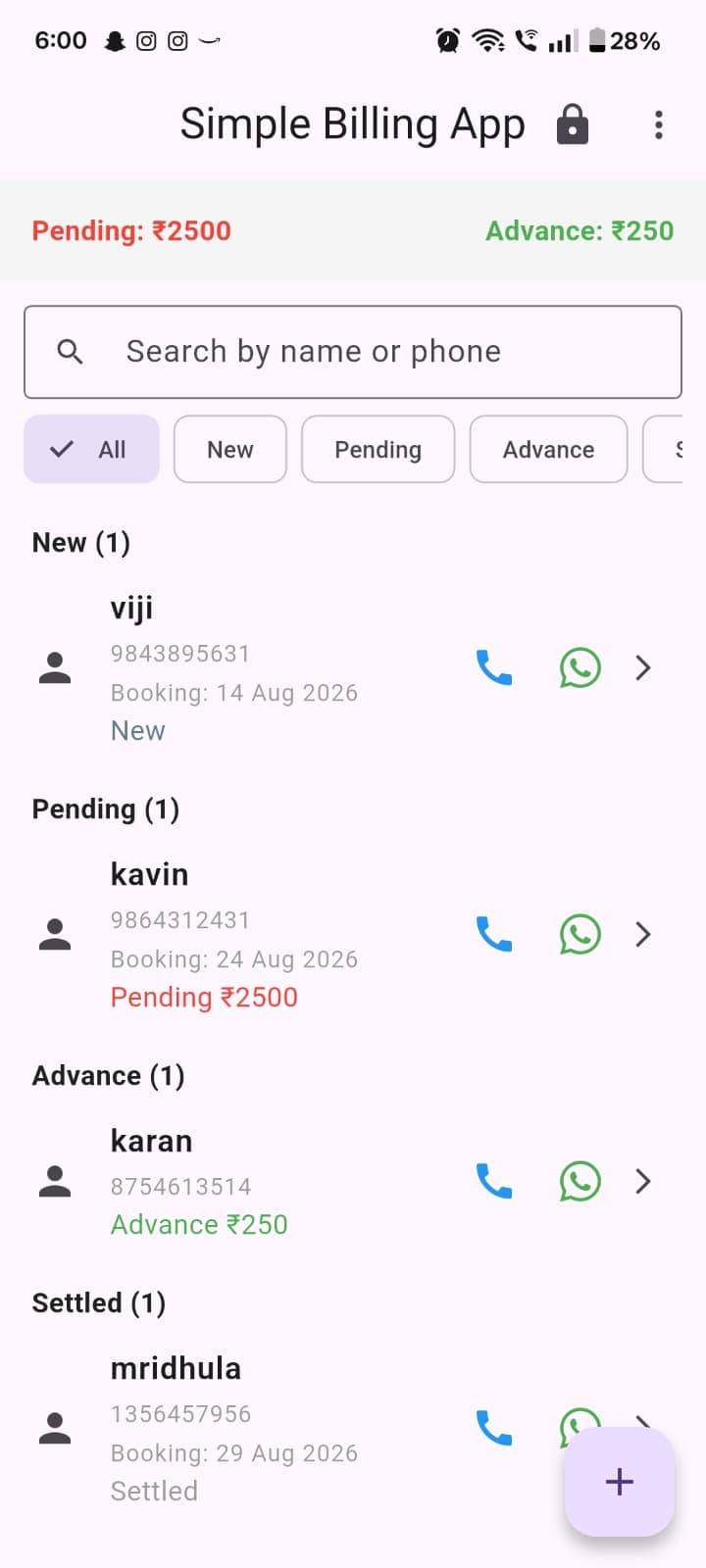
The dashboard the owner opens every day — total Pending and Advance across every customer, a search box, filter chips (All/New/Enquiry/Pending/Advance/Settled), and a grouped, sorted customer list.
- Tap a customer to open their ledger
- Long-press for edit / delete / move-to-enquiry actions
- Tap the WhatsApp icon on a row to send that customer's full statement
- Tap the lock icon to force-lock the app immediately
One screen answers "who owes me money" without opening a single customer record — the entire business's cash position at a glance.
Filter groups and the Pending/Advance totals are computed live from each customer's ledger fold-sum on every render, not stored or cached.
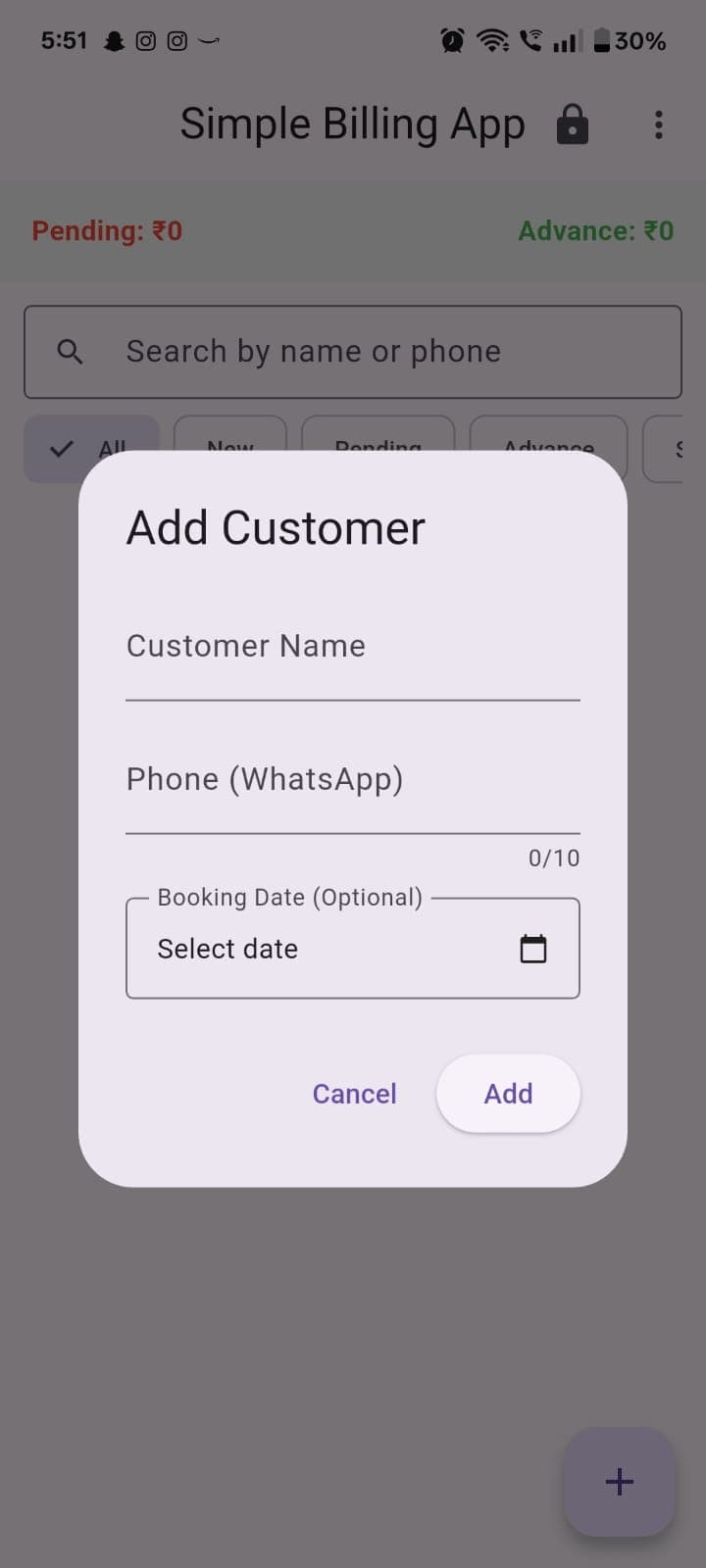
Add Customer
Captures a new lead or booking in one short form — name, phone (used for WhatsApp), and an optional booking date.
- Leaving the booking date empty creates an Enquiry
- Setting a booking date creates a Booking directly
The same three fields serve both a cold lead and a confirmed booking — the owner doesn't have to decide which flow to use up front.
Customer.id is generated as the millisecond epoch at creation time rather than a UUID; phone is capped at 10 characters via maxLength.
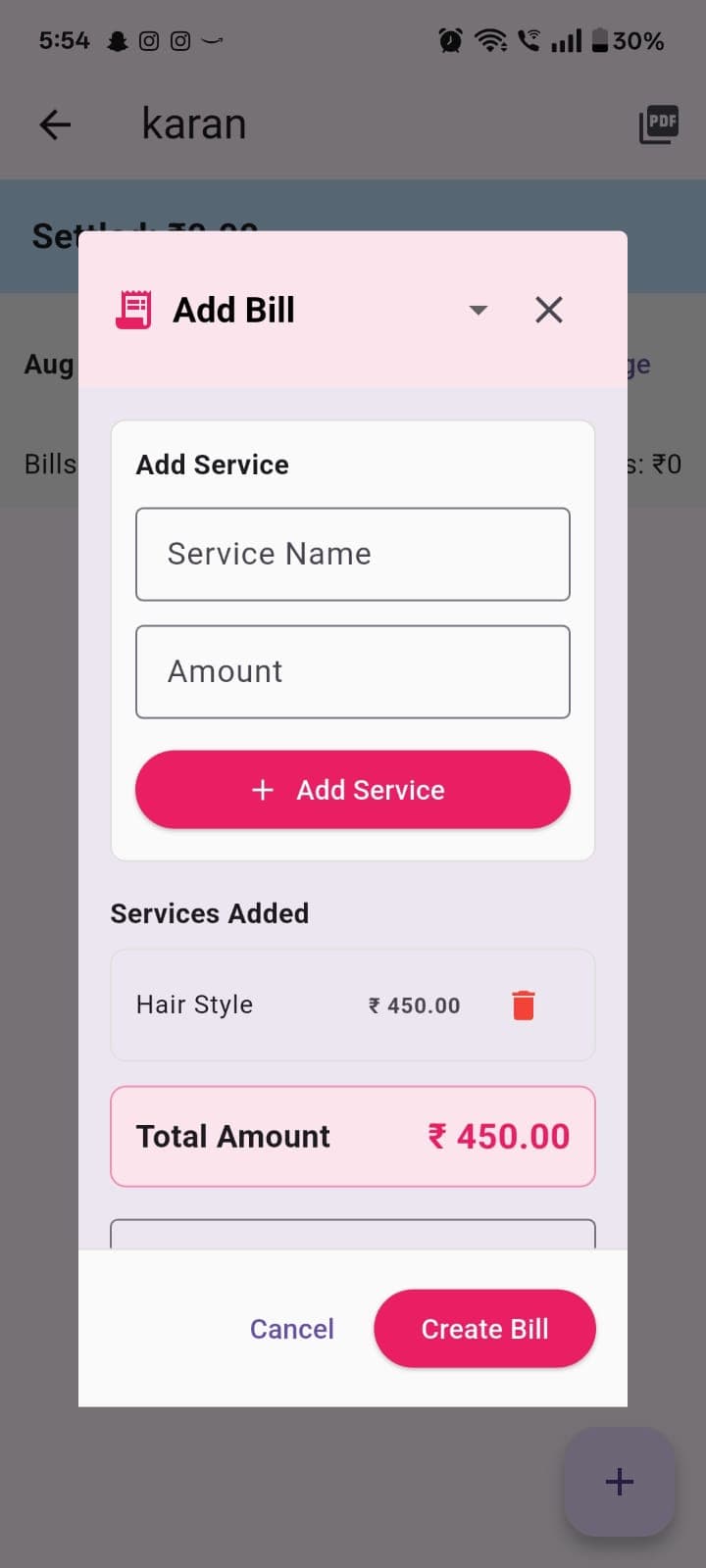
Add Bill
Bill mode of the Add Entry dialog — repeatable service-name/amount rows, building up an itemized total.
- Add Service appends a line item
- Total Amount updates live as services are added
- Create Bill saves the entry and auto-generates a bill number
An itemized bill (not just a lump total) is what makes the generated PDF read as a real invoice rather than a note.
Hidden entirely for Enquiry-status customers at the UI level — a lead can't be invoiced before a booking is confirmed.
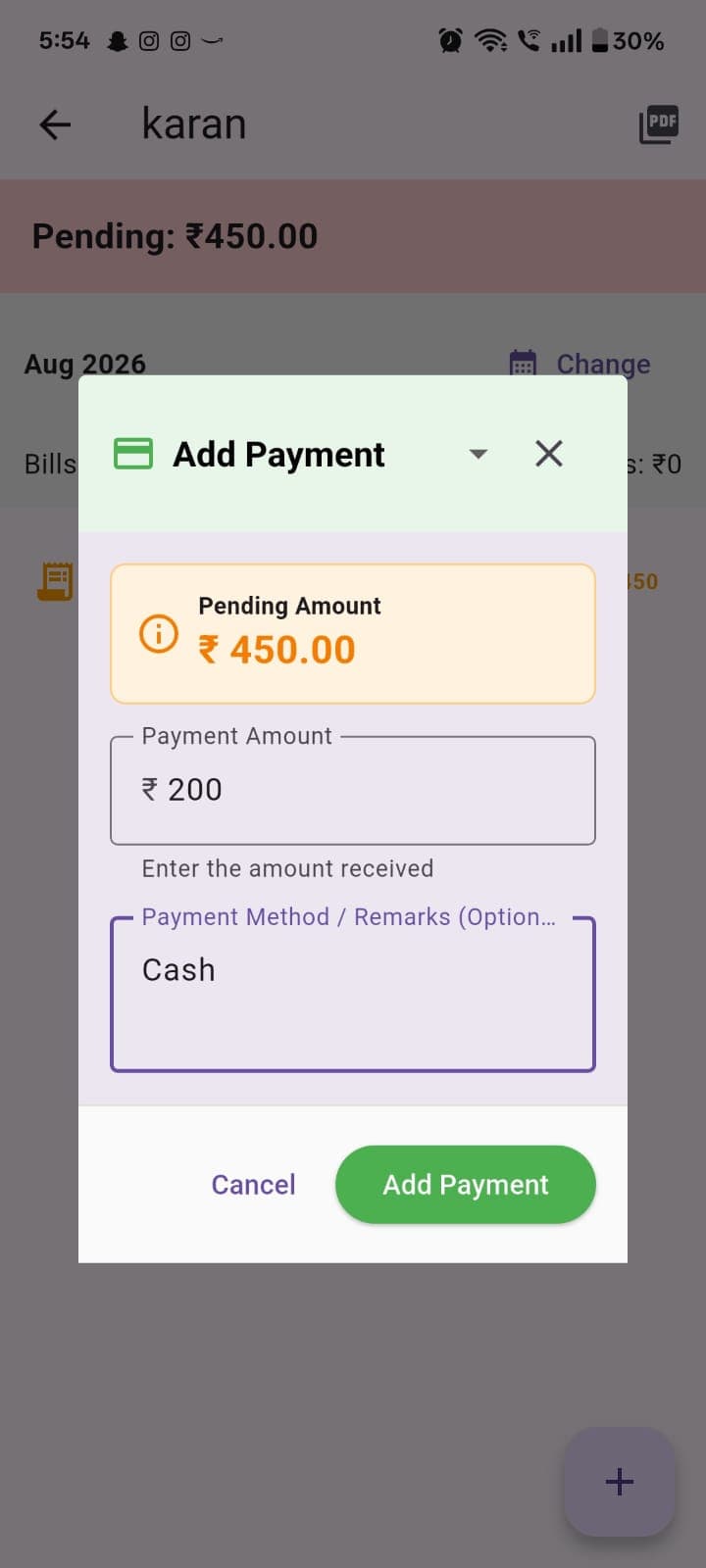
Add Payment
Payment mode of the same dialog — an amount field shown directly against the current pending total, plus a free-text method/remarks field.
- Payment Amount is validated against the pending balance shown above it
- Payment Method / Remarks captures how the payment was made (Cash, UPI, Card, etc.)
Showing the pending amount inline means the owner never has to leave the dialog to check what's owed before recording a payment.
A payment entered larger than the pending balance triggers payment_split.dart's overflow logic automatically on save.
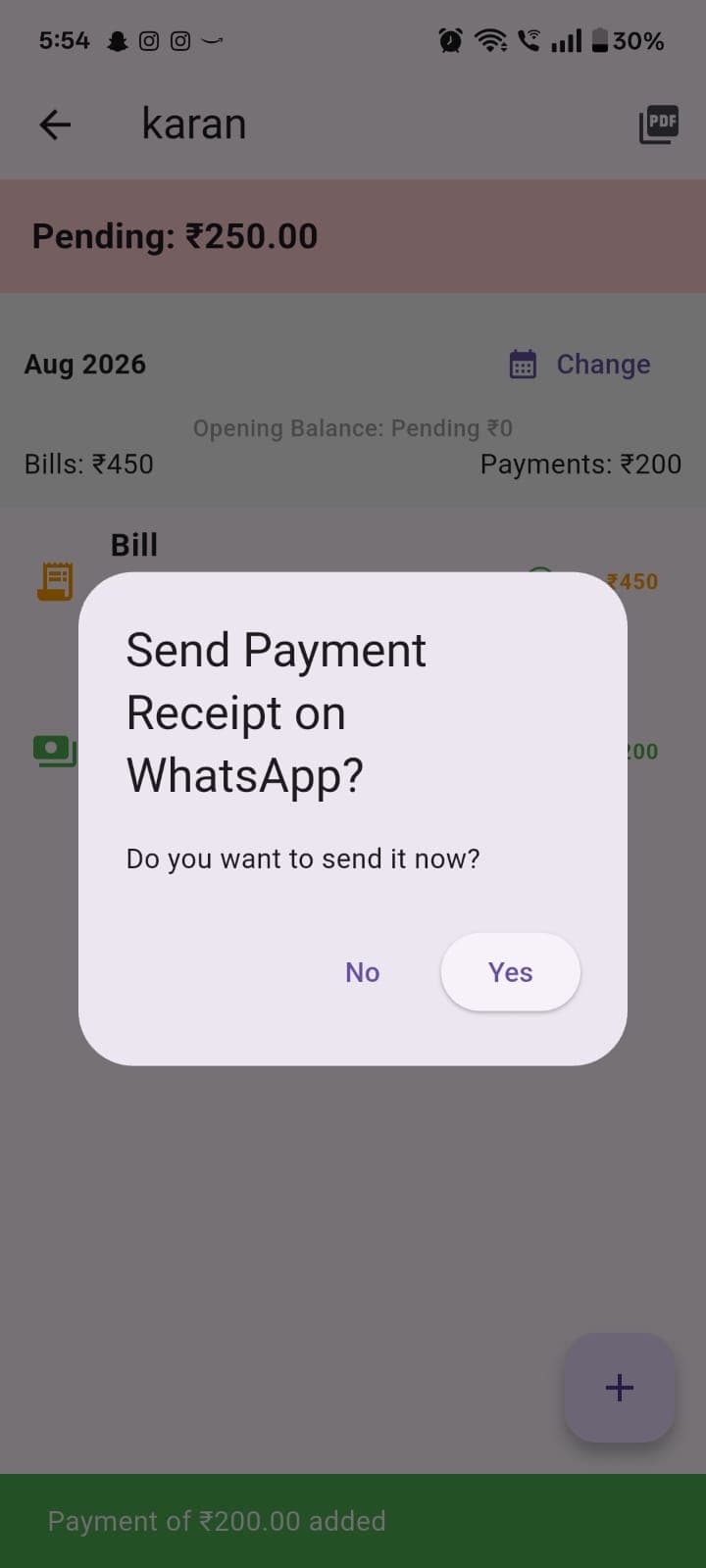
Send Receipt Prompt
Fires immediately after a bill or payment is saved — asks whether to send the corresponding document to the customer right away.
- Yes opens the three-way PDF / message / both send flow
- No simply dismisses, leaving the entry saved without sending anything
Keeps document delivery inline with the moment of the transaction, instead of a separate step the owner has to remember later.
The confirming toast ("Payment of ₹200.00 added") is a snackbar sourced from the same write path — no separate confirmation round-trip.
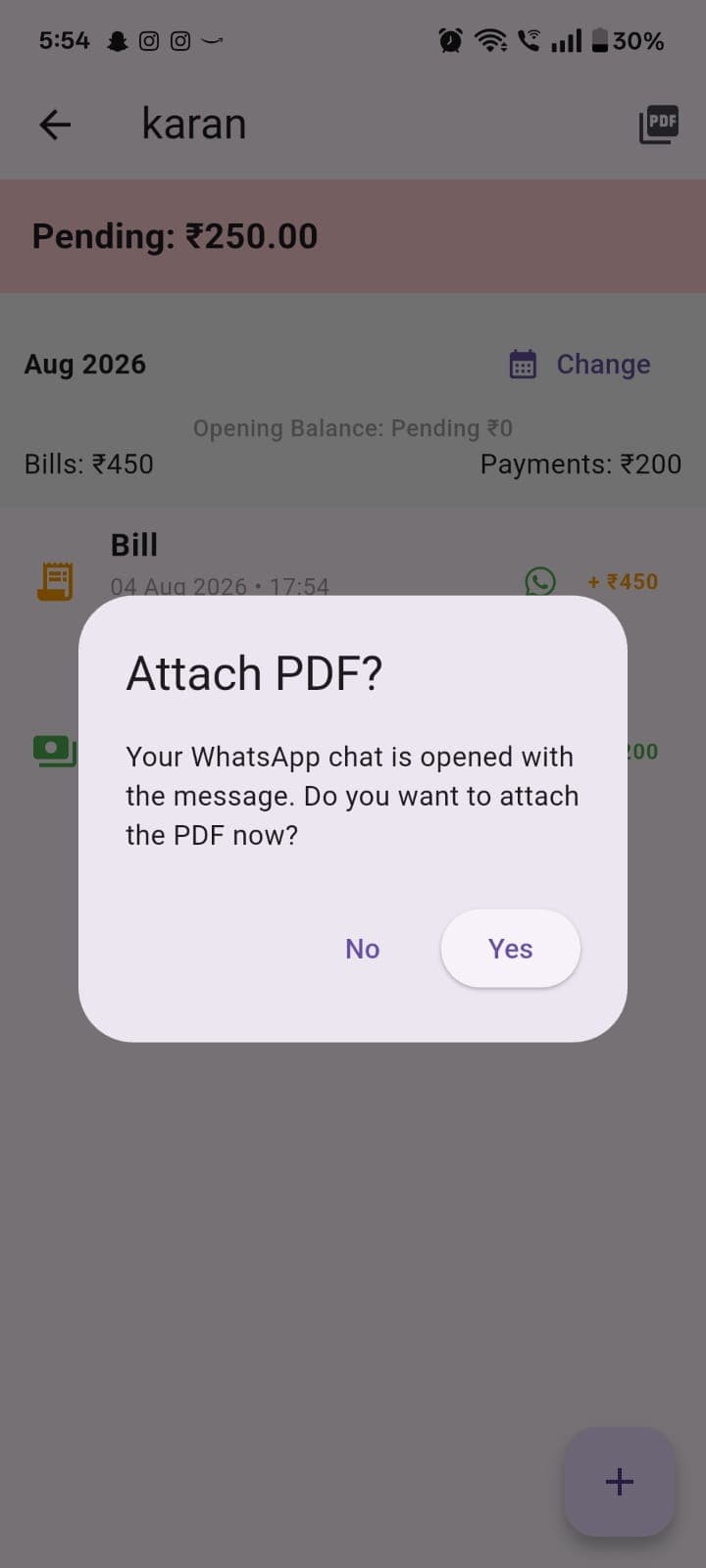
Attach PDF? Prompt
Shown after the WhatsApp chat opens with the pre-filled message — asks whether to also attach the generated PDF.
- Yes hands the PDF to the OS share sheet
- No leaves just the text message sent
Separating the message from the PDF attachment gives the owner a fast text-only option for quick reminders.
The PDF share is deliberately sequenced before the WhatsApp launch, working around an Android backgrounding race condition that can otherwise suppress the native share sheet.
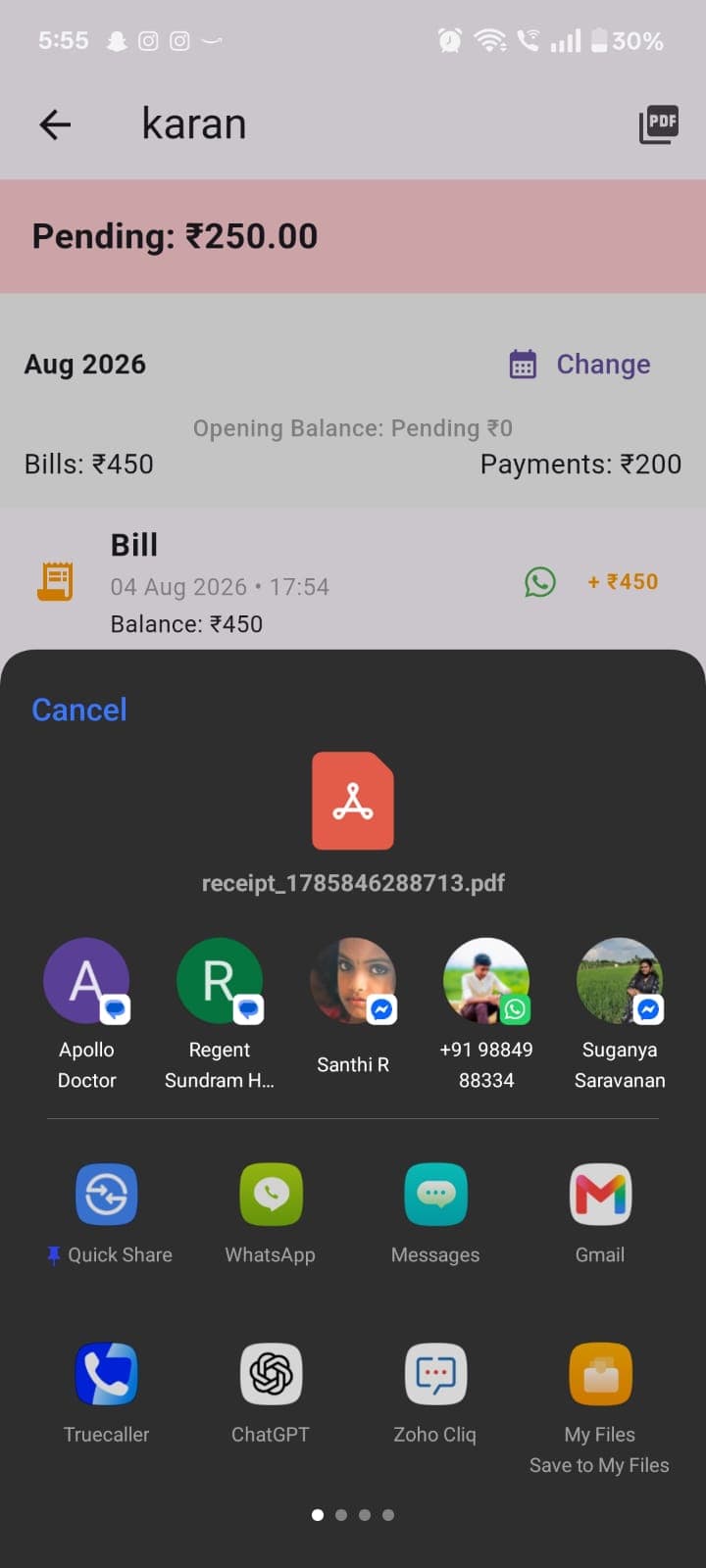
Native Share Sheet
The OS-level share sheet, handing the generated receipt PDF off to WhatsApp, Gmail, Quick Share, or any other installed app.
- Any installed app capable of receiving a file can be selected as the destination
The customer isn't locked into WhatsApp — the same generated document can reach them by any channel the owner prefers.
Powered by share_plus; the PDF is written just-in-time to the OS temp directory immediately before the hand-off.
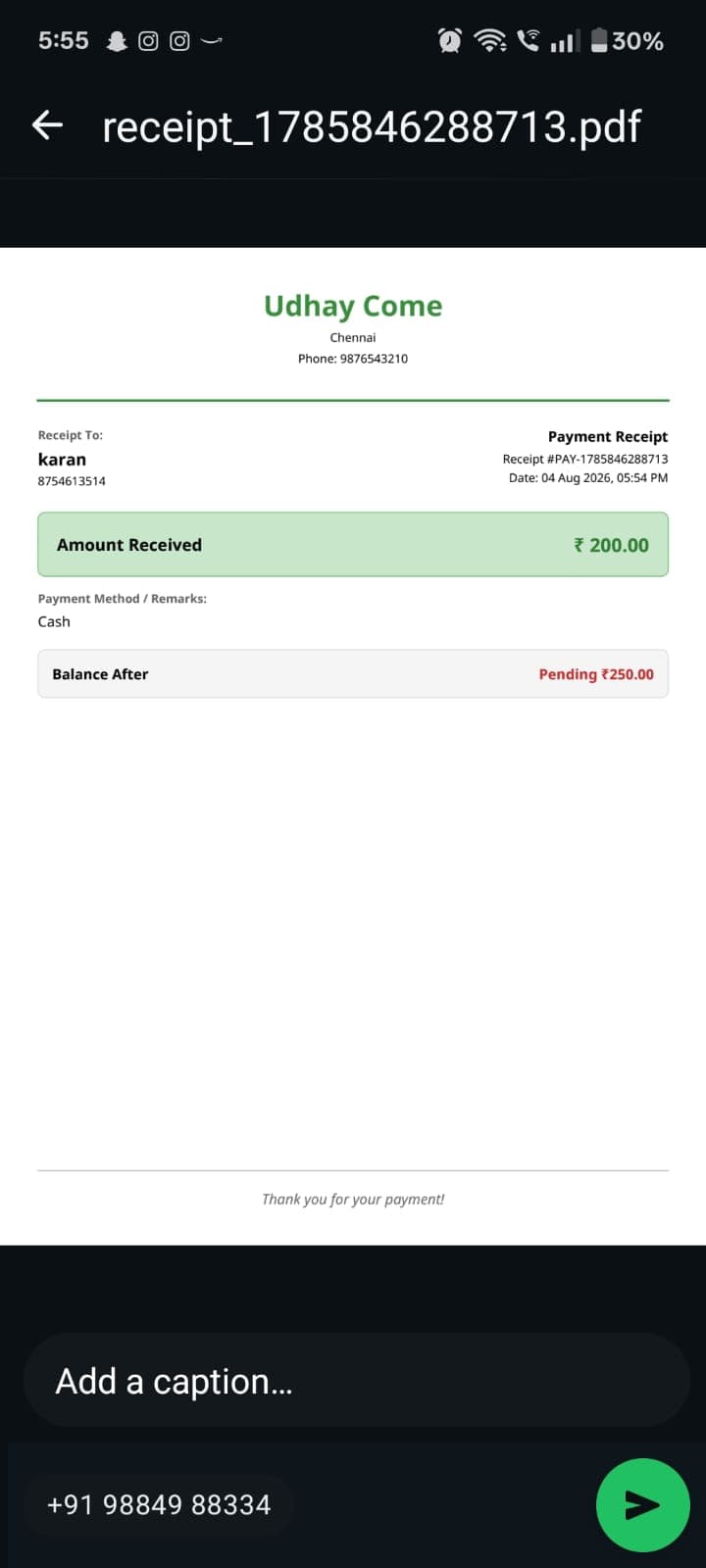
Payment Receipt PDF
The actual generated document — business letterhead, receipt number, amount received, payment method, and the resulting balance.
- Read-only — shared directly from here into WhatsApp's outgoing message composer
A professional, letterhead-branded receipt the customer can keep, forward, or print — not a screenshot of an app screen.
Built with the pdf package and the bundled NotoSans font specifically so the ₹ glyph renders correctly with zero network connectivity.
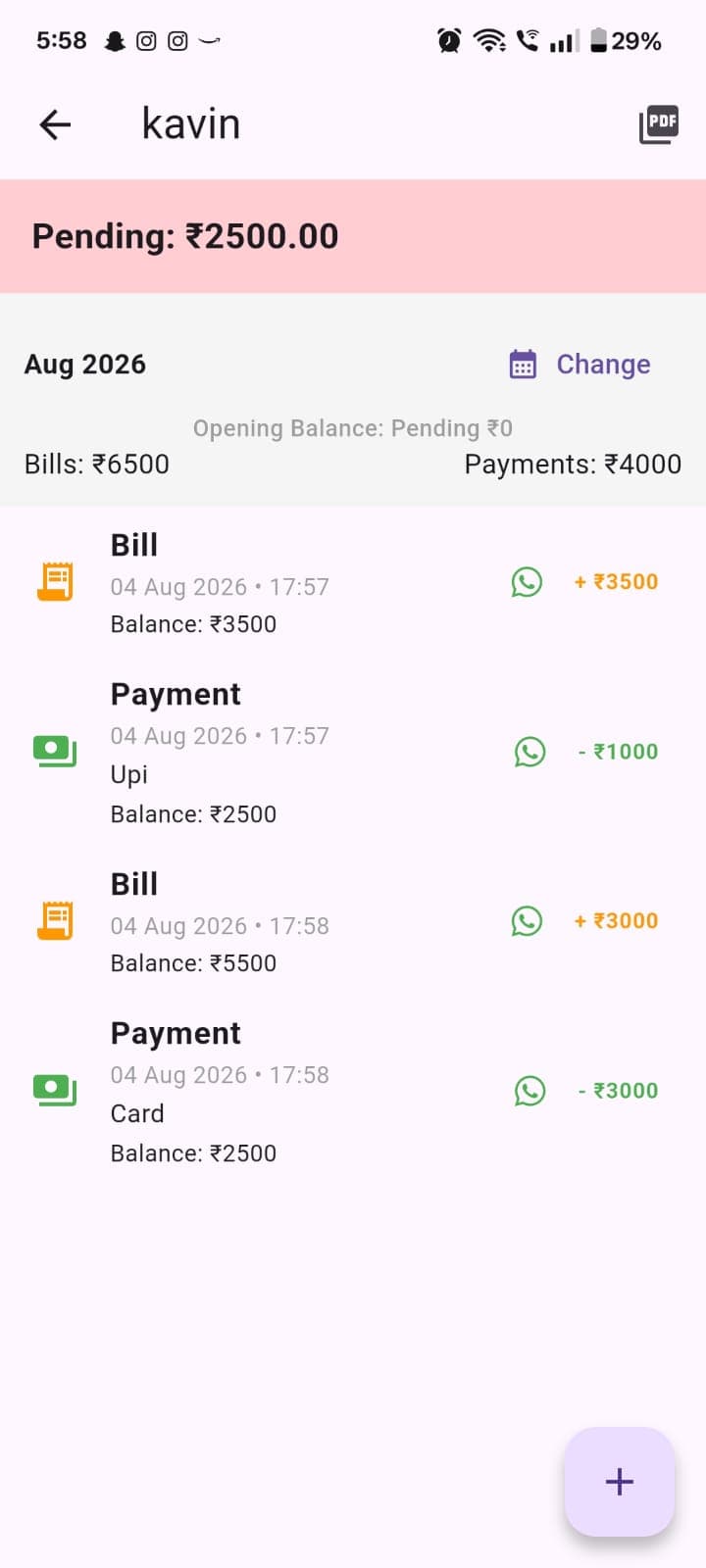
Customer Ledger
A per-customer view: the month's Bills and Payments totals, an opening balance carried in from prior months, and every ledger entry for the selected month.
- Change jumps to a different month
- Long-press an entry for Edit / Delete (current month only)
The full financial history of one customer, in one running view — exactly what a business owner needs before a follow-up call.
Entries outside the current calendar month are month-locked — the long-press handler becomes a no-op once the period rolls over.
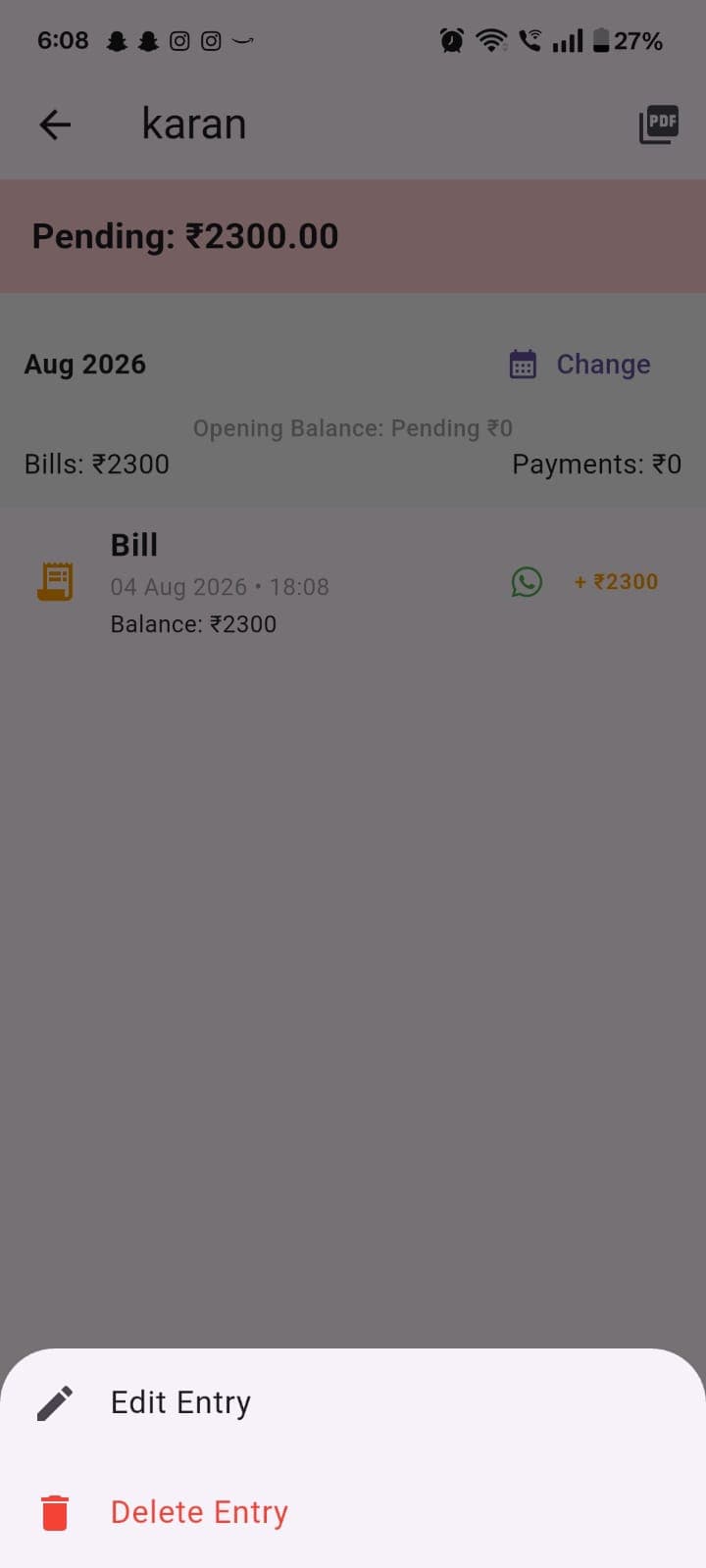
Edit / Delete Entry
The action sheet that appears on a long-press of a current-month ledger entry.
- Edit Entry opens the entry pre-filled for correction
- Delete Entry removes it, with an UNDO snackbar available immediately after
Mistakes made today are one tap to fix — without exposing an edit path for entries from a month that's already closed.
Undoing a deleted bill recreates a bare entry with the same type, amount and date, but not its original itemized services or bill number — a documented, honest limitation.
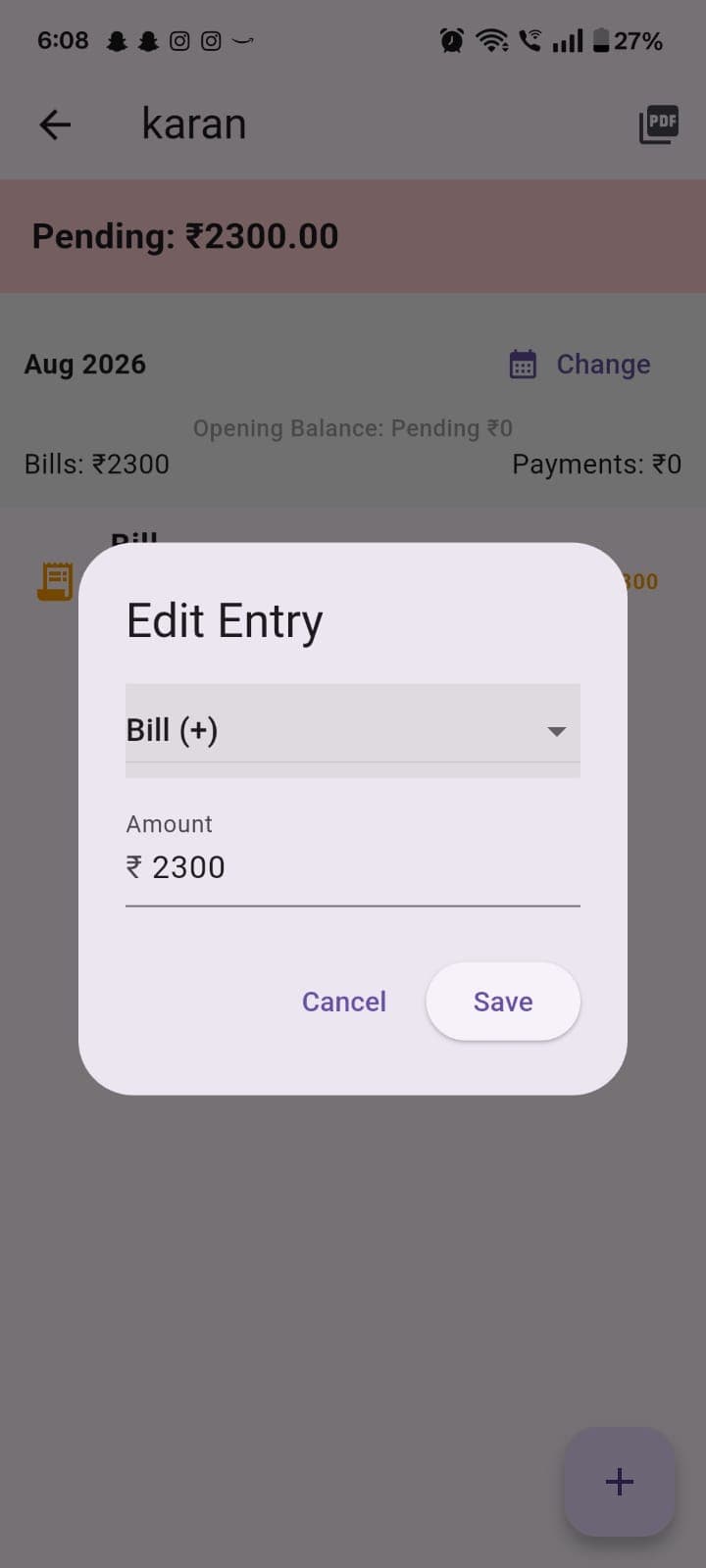
Edit Entry
Lets the owner correct the type or amount of a same-month ledger entry.
- Save writes the correction back to the ledger box immediately
Fixes a mistyped amount without deleting and re-creating the whole entry.
Editing an entry resets its date to the moment of the edit rather than preserving the original transaction date — an honest, documented trade-off.
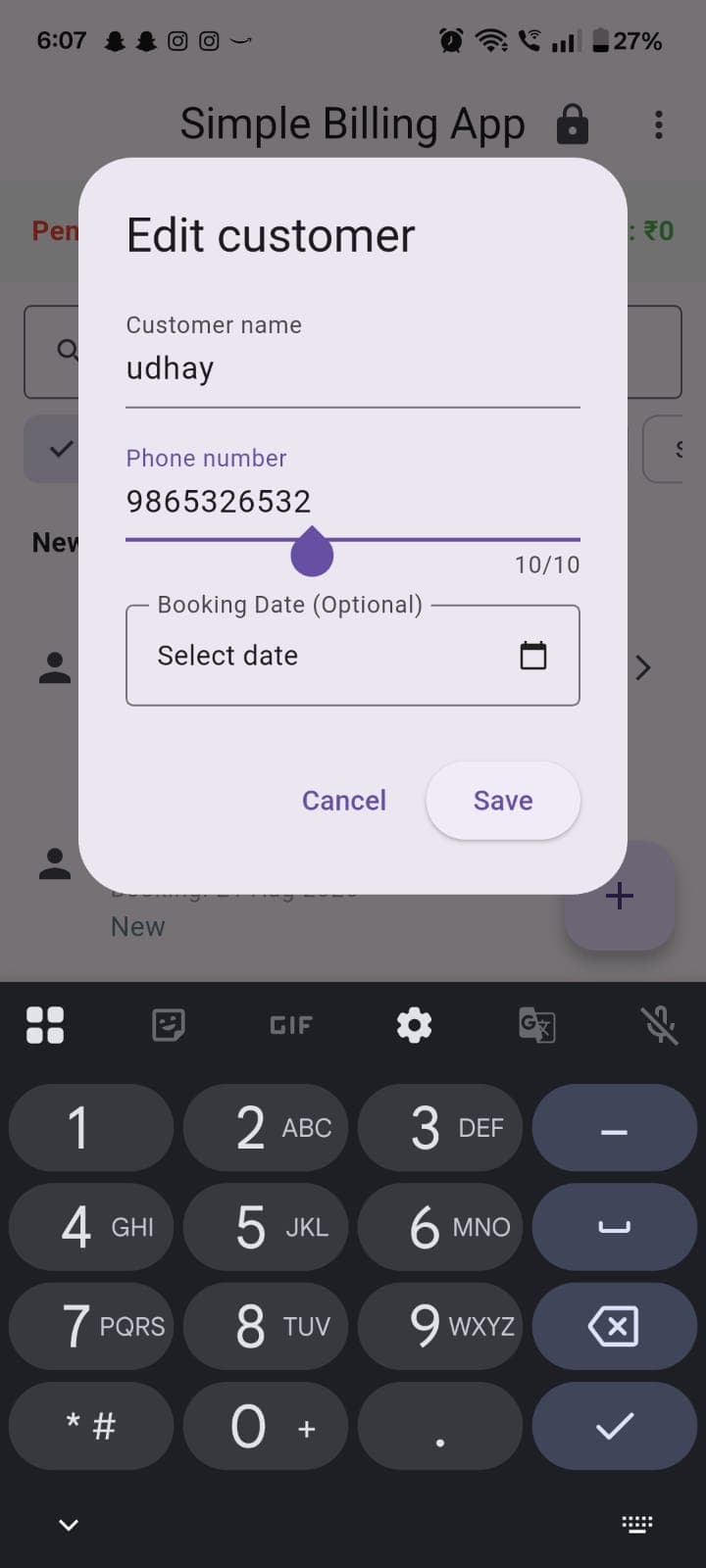
Edit Customer
Updates a customer's name, phone number or booking date after they've already been added.
- A slider-style control adjusts the phone number field
- Save writes the change to the customers box
Contact details change — a customer's number gets corrected without losing their entire ledger history.
Customer.id never changes on edit, so every ledger_<id> box and booking reference stays valid across the update.
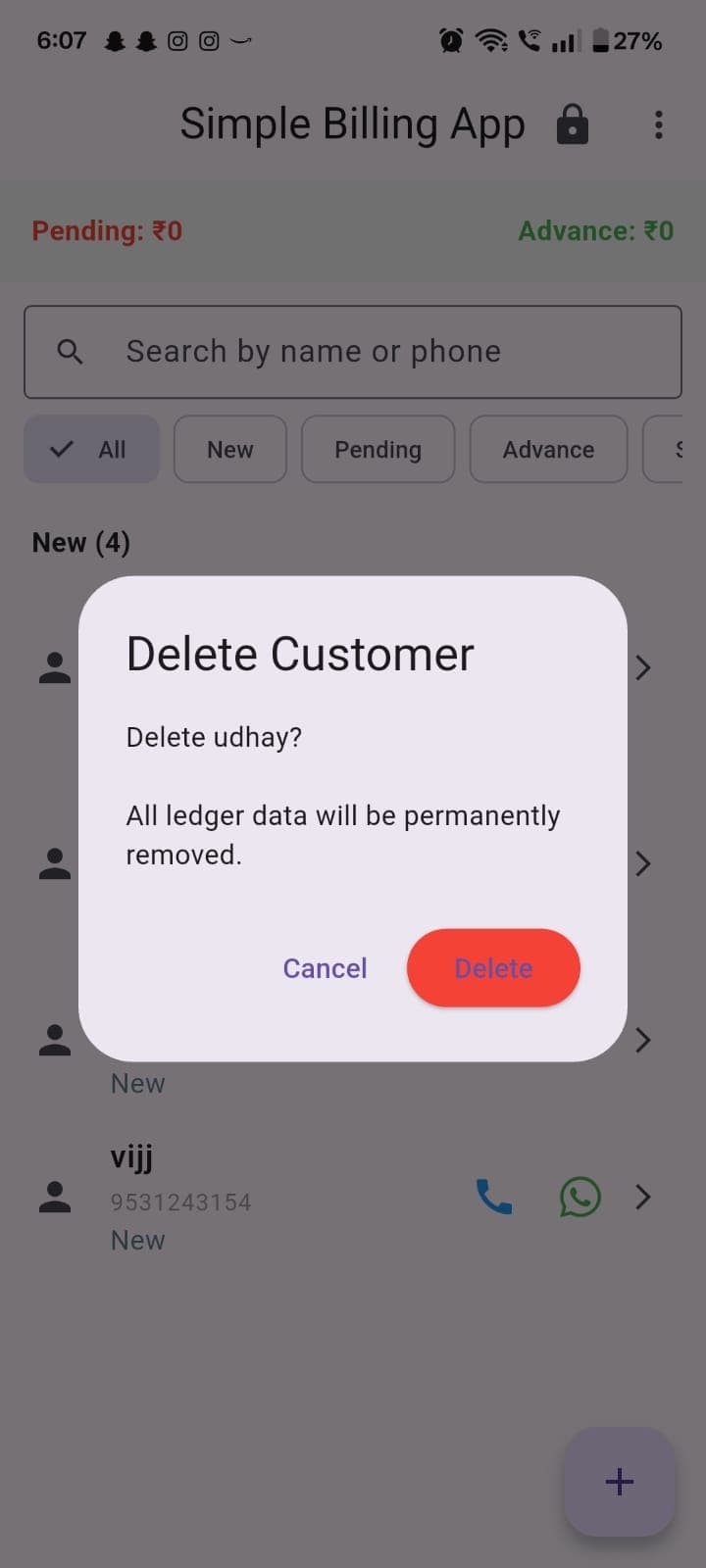
Delete Customer
A confirmation step before permanently removing a customer and their entire ledger.
- Delete permanently removes the customer and their ledger box
- Cancel backs out with nothing changed
A deliberate, named confirmation guards against losing a customer's full financial history to an accidental tap.
Deleting a customer also deletes their dedicated ledger_<customerId> Hive box from disk, not just the customer record.
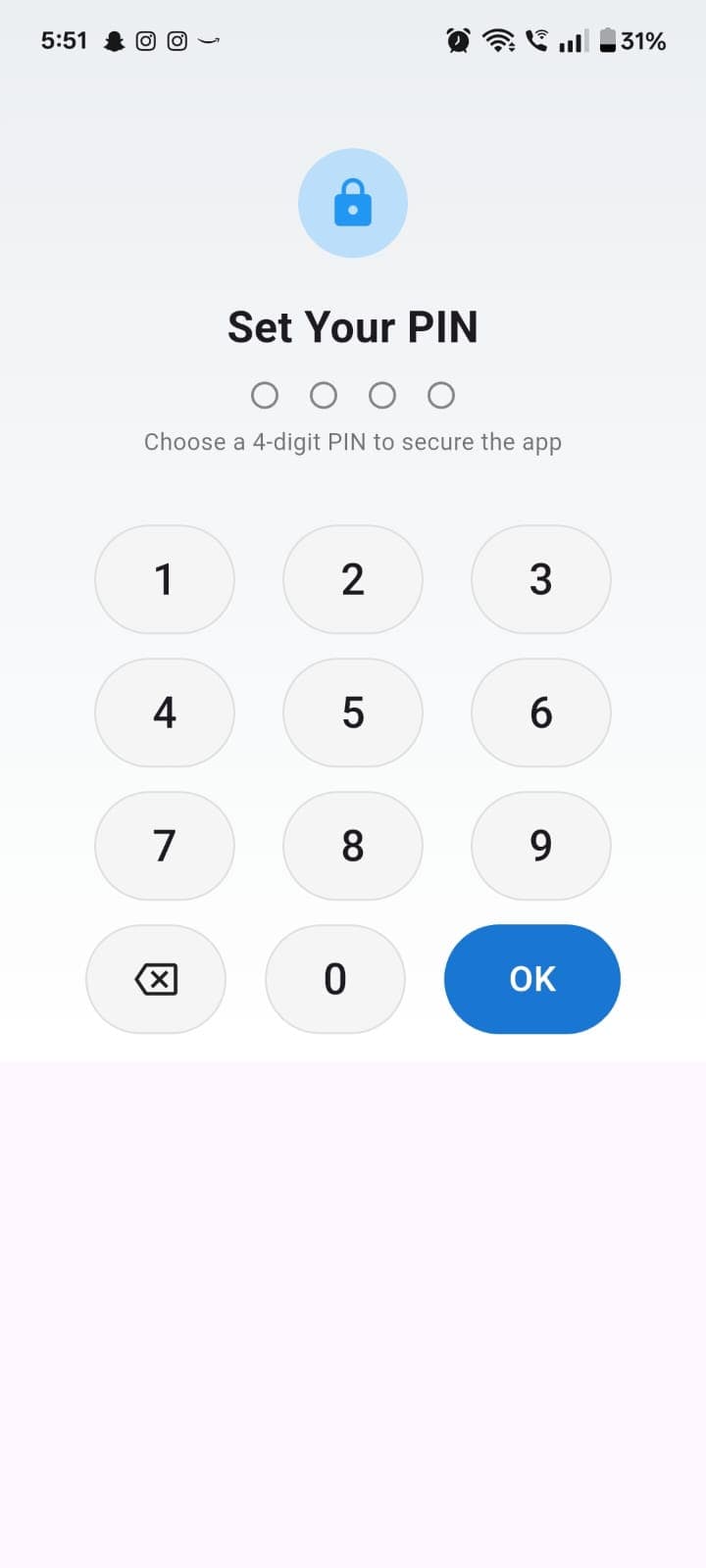
Set Your PIN (First Run)
Step one of the first-run wizard — choosing the 4-digit PIN that protects the app going forward.
- A 4-digit keypad; the four dots above fill in as digits are entered
Sets up device-level protection for financially sensitive data before a single customer is ever added.
The PIN is hashed with SHA-256 before storage — see the Security section for the honest status of this control.
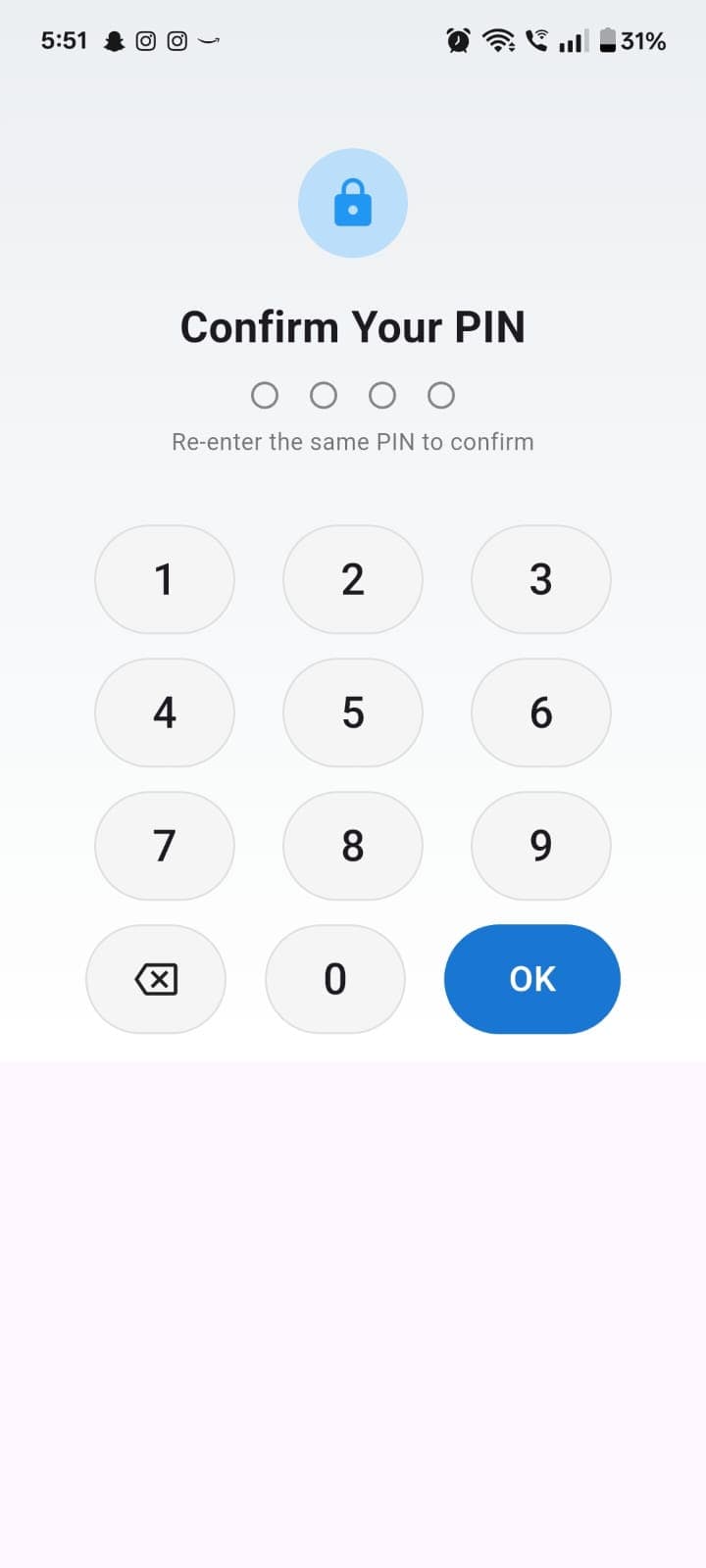
Confirm Your PIN
Step two of the first-run wizard — re-entering the same PIN to confirm it before it's saved.
- A mismatch returns the user to Set Your PIN rather than silently accepting a typo
Prevents the owner from locking themselves out on day one with a mistyped PIN.
Only on a successful match does the app proceed to Business Profile capture and hash-store the PIN.
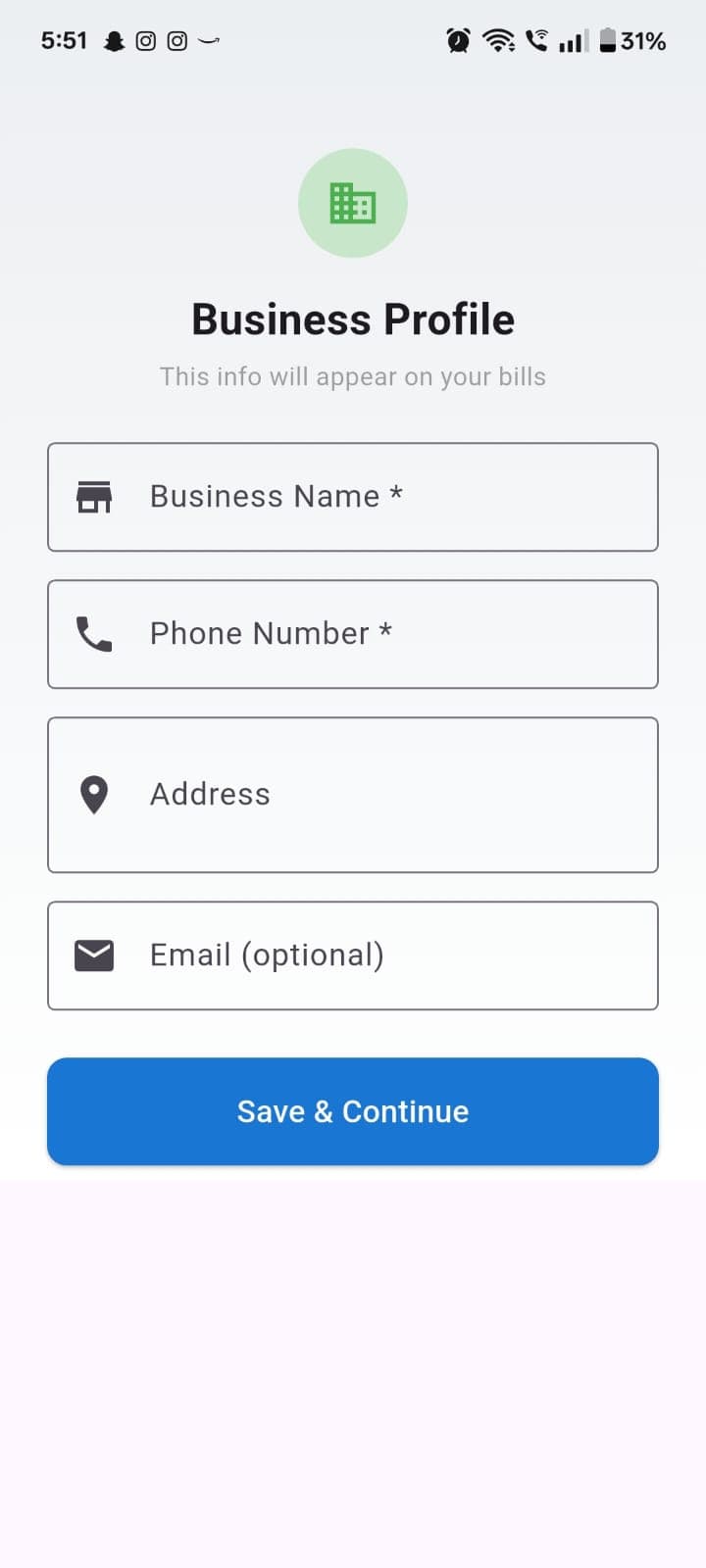
Business Profile (First Run)
Step three of the first-run wizard — capturing the business name, phone, address and optional email that will appear on every future bill.
- Save & Continue writes the profile and proceeds into the Home Screen
Every PDF the app ever generates is branded correctly from the very first bill — no default placeholder ever ships to a customer.
Business Name and Phone are marked required in the UI; Business Name is not actually enforced on save, an honestly-documented gap.
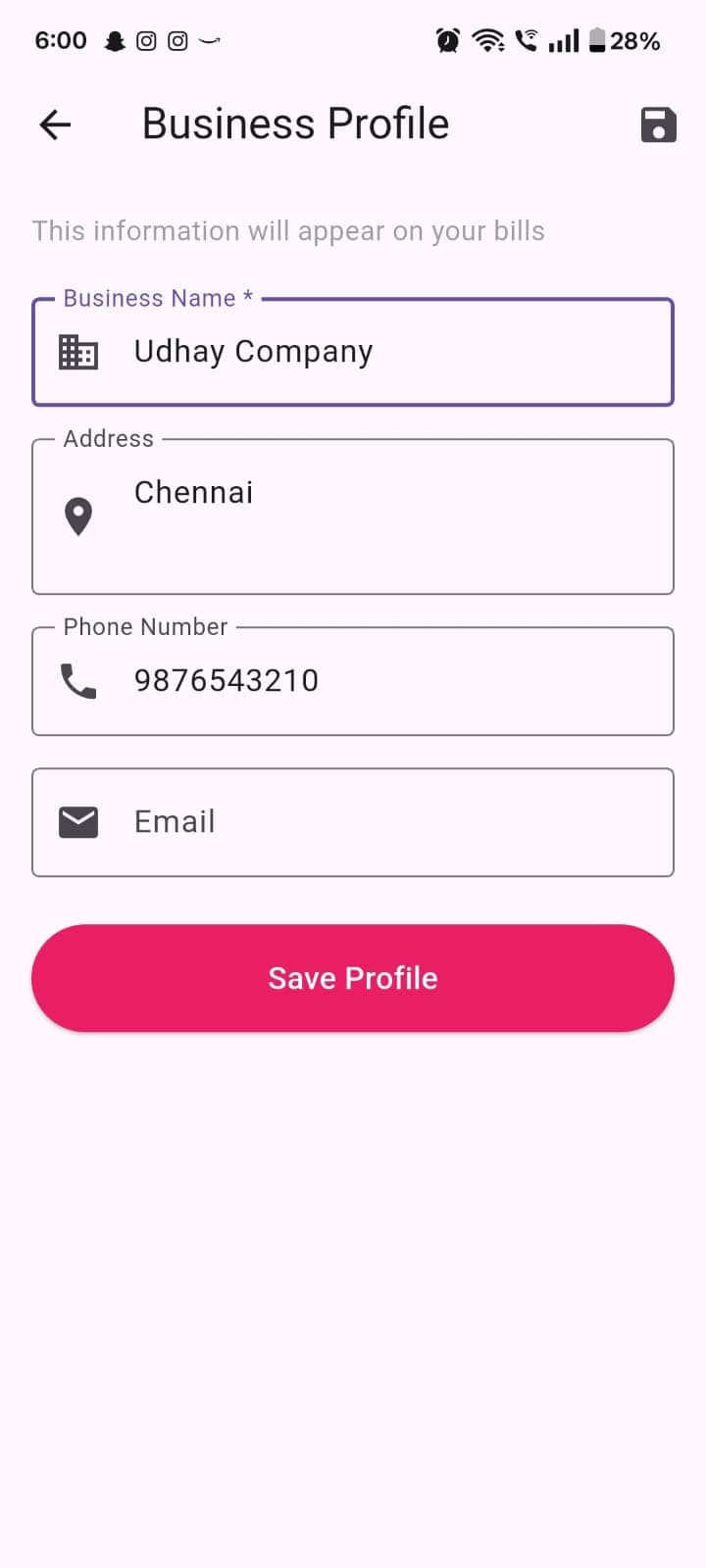
Business Profile (Settings)
The same four fields, revisited later from Settings — lets the owner update their letterhead details at any time.
- Save icon in the top bar writes the update immediately
A business's phone number or address changes — one edit here updates every bill, receipt and statement generated afterward.
A one-time, idempotent migration renames an older generation of settings keys (client_* → business_*) the first time a legacy install opens the updated app.
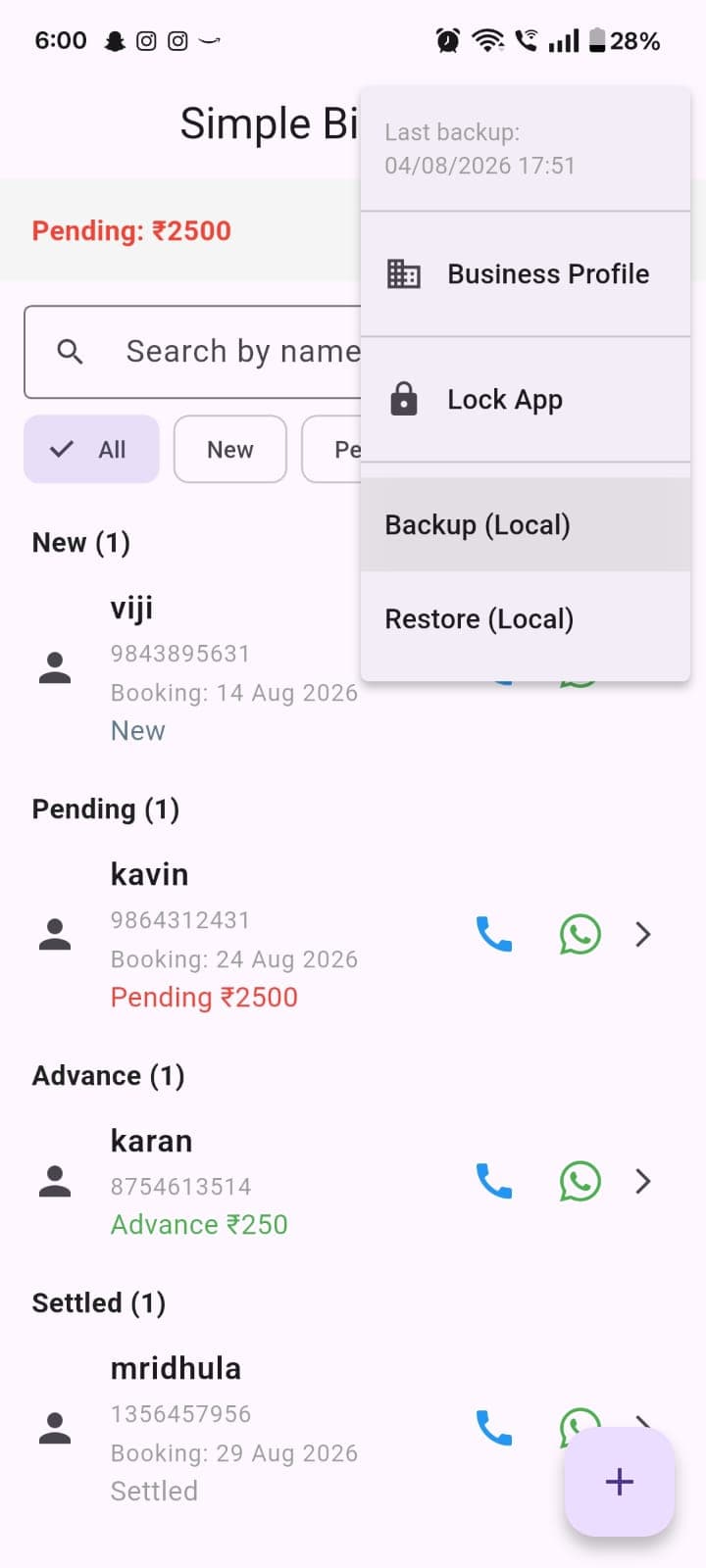
Settings Menu
The overflow menu — last backup timestamp, Business Profile, Lock App, and manual Backup / Restore actions.
- Backup (Local) zips the dataset immediately
- Restore (Local) walks through selecting and applying a backup archive
- Lock App force-locks without waiting for the idle timer
Every data-safety action the owner might need — backup, restore, lock, profile — lives in one predictable place.
The displayed "Last backup" timestamp is read from the app_settings box; a second, largely dead-code copy exists in the meta box (see Technical Challenges).
Twelve systems, one solo build.
Offline-First Design
Every feature works in airplane mode, because none were built with a network path in the first place — no sync, no cached-vs-fresh distinction to reason about.
Hive Local Database
An embedded NoSQL store, not a relational engine — typed Dart objects persisted directly, with no SQL and no ORM layer in between.
Customer Ledger Engine
One dedicated Hive box per customer (ledger_<id>), opened lazily, keeping every balance and history lookup proportional to one customer's data.
Live Balance Calculation
Balance is a fold-sum over ledger entries, computed on every read — never a stored field, so it can never drift out of sync.
Billing Engine
Itemized, multi-line bills with auto-generated bill numbers, captured through the same dialog that handles payments.
Payment Split Logic
A pure, unit-tested function that turns a single real-world overpayment into a settle-then-advance pair of ledger entries.
Booking Reminder Engine
Deterministic, idempotent notification IDs plus a full re-sync on every cold start — reminders survive both an app restart and a device reboot.
PDF Generator
Three dedicated generators build A4 bills, receipts and statements, bundling a font specifically to render the ₹ glyph without network access.
WhatsApp Integration
A native whatsapp:// deep link tried first, falling back to a wa.me web link — sequenced around a real Android backgrounding race condition.
Backup & Restore
A zip of every .hive file, timestamped into Downloads, with automatic seven-day retention pruning and a clean-restart restore flow.
Business Logic Separation
booking_rules, payment_split and profile_migration are pure functions in lib/utils — the only layer in the app with automated unit tests.
Platform Integrations
Eight plugin packages bridge to biometrics, notifications, PDF generation, sharing and file access — none of them make a network call.
Offline isn't a fallback mode here — it's the only mode.
Every feature in the app functions with the device in airplane mode, because none of them were built with a network path in the first place. Data lives entirely in on-device Hive storage; there is no sync, no remote fetch, and no cached-vs-fresh distinction to reason about, because there is only one copy of the data.
Document delivery — WhatsApp deep links, phone calls — depends on the destination app and, at send time, on connectivity, but the bill or receipt itself is already generated and saved locally before that hand-off is attempted, so a delivery failure never risks the underlying record.
One Copy of the Data
No sync, no remote fetch — the on-device Hive store is the only copy that exists.
Fonts Bundled, Not Fetched
PDF generation bundles its own font specifically so ₹ rendering never depends on a network fetch.
Records Saved Before Delivery
A bill or receipt is generated and saved locally before any WhatsApp hand-off is attempted.
Backup Is Just a File
Backup and restore are pure local filesystem operations — no account, no upload, no remote dependency.
The trade-off is real and stated plainly: no multi-device sync, no off-device disaster recovery beyond a manually-moved backup file, and no way to recover data if the device is lost or destroyed before a backup was taken. That is the deliberate cost of the privacy-first premise this app is built on.
A narrow, honest threat model.
Built to stop a casual person browsing an unlocked or lost phone — with a clear, scoped roadmap ahead of launch.
PIN + Biometric App Lock
Automatic biometric attempt on launch via local_auth, falling back to a 4-digit PIN keypad.
Idle & Background Auto-Lock
Two independent 5-minute timers — one on foreground idle time, one on time spent backgrounded — force the lock screen back up.
Month-Locked Ledger Integrity
Entries outside the current month can't be edited or deleted, protecting statements already shared with a customer.
Narrow, Honest Threat Model
Designed to stop a casual person browsing an unlocked or lost phone — not, at this stage, someone extracting raw device storage.
Salted, Key-Stretched PIN Hashing
Moving PIN storage from unsalted SHA-256 to a salted, key-stretched hash (or biometric-only with a secure recovery path) before launch.
Encryption at Rest
Wiring up the AES key-derivation utilities already written in-source to every real Hive data box.
Encrypted Local Backups
Adding password/encryption protection to the backup archive itself, not just the live database.
Fast, without a server to offload to.
Every optimization here is about keeping a single-device app fast on its own.
Per-Customer Ledger Boxes
Every customer's transactions live in their own Hive box, opened lazily.
Keeps balance/history lookups proportional to one customer's data, not the whole business
Boxes Stay Open Per Session
A customer's ledger box is kept open rather than reopened on every screen visit.
Avoids re-decoding data that was just read when returning to a summary screen
Status Computed, Not Written
Enquiry/New/Pending/Advance/Settled is derived at read time from existing fields.
Adding a bill or payment never requires a second write to keep a status field in sync
Zero Network Round-Trips
Every screen reads from and writes to local storage only.
No loading spinner anywhere is waiting on anything but the device's own disk
Problems worth naming, including the ones still open.
Solved problems and scheduled fixes, documented with the same honesty — not hidden behind polish.
WhatsApp Share-Sheet Ordering
SolvedLaunching WhatsApp before sharing a PDF risks Android backgrounding the app mid-transition, which can prevent the native share sheet from appearing at all.
Fixed with ordering, not a workaround library.
Always resolve the PDF share first, then open WhatsApp — a reliable sequence rather than an assumed one.
Payment Allocation Without a Bill-Level Ledger
SolvedThe ledger tracks an aggregate balance, not which specific bill a payment applies to.
Rather than build a FIFO bill-matching engine, the payment splitter deliberately works at the aggregate level.
Settle what's pending, carry the rest as advance — matching how this business actually thinks about a customer's account: one running balance, not a stack of open invoices.
Reminders That Outlive the App Process
SolvedA locally scheduled notification is only useful if it survives the app being closed and the phone being restarted.
Combined platform-level boot receivers with an explicit application-level re-sync on every cold start.
A reminder set today still fires correctly after the phone has been rebooted in between — neither mechanism alone was reliable.
Statement PDF Opening Balance
Scheduled Before LaunchMonthly and full-history statement PDFs currently compute their running balance from zero, rather than carrying forward the customer's opening balance the way the in-app ledger view does.
Identified during this review as the single highest-priority fix — documented honestly rather than left unexamined.
Fixing the statement generator to match the in-app ledger view is first on the roadmap before any customer-facing statement is trusted again.
Print Aliased to Share
Scheduled Before LaunchThe Print icon on Bill and Receipt screens currently triggers the same PDF share action as Share, rather than a platform print dialog.
The printing package is already a declared dependency — it simply isn't wired to the print-dialog API yet in these screens.
Wiring the actual print dialog is a scoped, already-scaffolded fix ahead of release.
The codebase, in numbers.
What this is designed to deliver.
Simple Billing hasn't shipped to a store yet, so there are no production metrics to report — none are invented here. This is the operational capability it's built to deliver on release.
A paper notebook or spreadsheet, manually reconciled for every balance check.
A single, always-correct number per customer — correct by construction, not by careful bookkeeping.
No document to hand a customer without a printer, an email account, or a delivery method.
A professional PDF bill or receipt, delivered over WhatsApp, in the time it takes to tap Share.
A cloud billing subscription holding financially sensitive customer records on a third-party server.
A privacy-first, on-device alternative — no monthly cost, no vendor breach risk, no lapsed-subscription lockout.
Actively in development — here's what's next.
A real, prioritized roadmap grounded in this review — not a vague sense that it needs more work.
Stronger PIN Protection
Move PIN storage to a salted, key-stretched hash — or lean further into biometric-first unlock with a securely-stored recovery path.
Encryption at Rest
Connect the AES encryption utilities already written in the codebase to every real data box — the key-derivation work is done, it just needs wiring up.
Accurate Statement Balances
Fix the statement PDF's opening-balance calculation so it matches the in-app ledger view before any customer-facing statement ships.
Business-Configured UPI Link
Make the UPI payment ID a Business Profile field instead of a placeholder constant, so every payment link is real from day one.
Scoped-Storage-Safe Backups
Move backup writes to the Storage Access Framework, with a visible status if a backup attempt ever fails — never silent.
One Unified Auto-Lock Timer
Consolidate the two independent 5-minute auto-lock timers into a single, shared, tested mechanism.
Booking Overlap Warnings
A gentle warning — not a hard block — when a new booking is scheduled against an existing one at the same time.
Real Automated Test Coverage
Replace the default placeholder test and add real widget/integration coverage for the ledger, add-entry, and lock-screen flows.
Store-Ready Release Build
Rename the Android application ID and configure real release signing ahead of the first store submission.
What building this alone actually taught.
Vocabulary Drift Is a Real Signal
The client_* → business_* settings migration is a fossil record of the product's own concept shifting mid-build — from a single "client" to a proper multi-customer "business" model. Writing an idempotent migration meant that shift didn't cost existing data.
A Feature Stubbed Twice Is Unfinished
Discovering that both the encryption layer and "last backup time" tracking each quietly exist in two separate, disconnected forms is a direct consequence of iterating solo without a second reviewer catching the duplication. Now a concrete, prioritized cleanup item.
A Locked Period Is Worth Building, Even in Miniature
The month-lock on ledger edits came from thinking through what happens to a bill after it's already been shared with a customer — a one-line boolean guard, considered up front rather than patched in after a real complaint.
Placeholders Need a Louder Marker
The hardcoded UPI link was always known to be a demo value, but nothing in the running app currently tells the owner that. A build-time warning would have been cheap insurance against it shipping unmodified.
A deliberately small, honestly-built tool — getting ready to launch.
Simple Billing solves one narrow problem — a solo service provider's need to know who owes what, and to hand them a professional-looking document over WhatsApp — without reaching for a backend, a login system, or a subscription model it doesn't need.
The parts that work today — the ledger engine, the payment splitter, the booking-reminder pipeline, the Enquiry funnel — are unit-tested where it matters and hold up under review. The parts still ahead are tracked on a real, prioritized roadmap rather than left as a vague sense that "it needs more work."
It's a solo build, still in active development, with a clear, honest punch list between here and its first release.